

Get the FAFSA right
Before you log in to StudentAid.gov, gather the materials that will slow you down if you miss them. The form asks for specific numbers that are difficult to locate mid-session. Having them ready cuts the process from a frustrating chore into a straightforward data entry task.
Build your digital toolkit
Create a Federal Student Aid (FSA) ID for yourself and your parents (if you are a dependent student). This ID serves as your legal signature for the entire application. If you or your parents have filed taxes recently, log in to the IRS Data Retrieval Tool (DRT) beforehand. The DRT pulls your tax information directly into the FAFSA, eliminating manual entry errors and reducing the time spent on the form.
Gather financial records
You need exact figures for income and assets. For the 2026–2027 cycle, you will likely need the prior-prior year tax returns. Collect W-2 forms, bank statements, and records of untaxed income such as child support or disability benefits. If you own a business or farm, have the current balance sheet ready. The more precise your initial data, the fewer correction requests you will face later.
Prepare personal identifiers
Have your Social Security number, driver’s license number, and alien registration number (if applicable) on hand. You will also need your parents’ Social Security numbers if you are a dependent student. If you are registered with the Selective Service, ensure your registration is active. Missing these details will halt the application until you locate the correct documentation.
Work through the steps
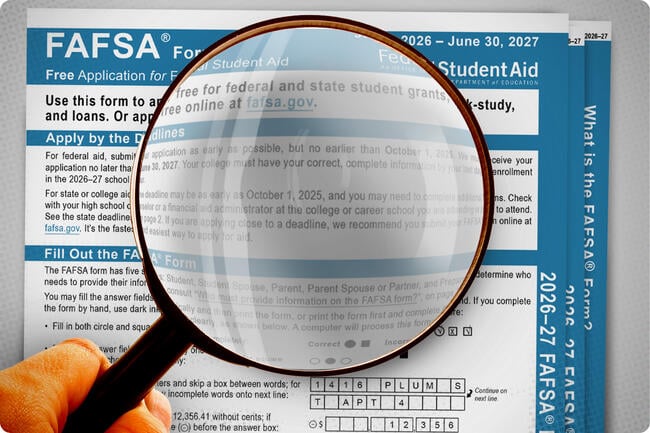
Completing the FAFSA form for the 2026–27 cycle requires moving through the application in a specific order. The form is divided into distinct sections, and skipping or rushing through them can lead to errors that delay your financial aid offer. Follow this sequence to ensure your data is accurate and your application is processed without issues.

Before you can access the form, you and your parents (if you are a dependent student) need an FSA ID. This acts as your legal electronic signature. Visit studentaid.gov to create one using your Social Security number and email. Verify your email immediately, as confirmation can take up to three days. Without a verified FSA ID, you cannot submit the application.
Log in to studentaid.gov and select "Start a New Application." The form now uses a "prior-prior year" tax approach, meaning you will report income from two years ago. For the 2026–27 FAFSA, you will use 2024 tax data. Gather your IRS tax return transcripts and W-2 forms before beginning. This upfront preparation prevents you from having to pause and search for documents mid-flow.
The first sections ask for your demographic details and dependency status. Answer these questions honestly; the form uses them to determine whose financial information must be included. If you are married, you must include your spouse’s income and assets. Incorrect dependency status is the most common reason for application rejection, so double-check these answers against IRS dependent rules.
Use the IRS Data Retrieval Tool (DRT) to pull your tax information directly into the FAFSA. This is the most reliable way to avoid manual entry errors. If the DRT is unavailable, you can manually enter the data, but you must match the IRS transcript exactly. After importing, review the numbers carefully. Even a small discrepancy can trigger a request for verification later.

Enter the Federal School Code IDs for every college you are considering. You can list up to 20 schools at a time. Your information will be sent to all of them simultaneously. If you forget a school, you can add it later before the application is submitted, but it is best to include all potential options early to ensure timely processing by each institution’s financial aid office.
Once all sections are complete, you and your parents (if applicable) must sign the form using your FSA IDs. Review the Summary Page one last time to ensure no fields are blank. Submit the application. You will receive a confirmation email with your Student Aid Index (SAI) number within a few days. Keep this number safe, as you will need it when reviewing financial aid offers.
After submitting, check your email and the FAFSA website for a confirmation receipt. If you see a "Success" message, your application is in the system. However, some schools may request additional documentation, such as verification of income or identity. Respond to these requests promptly to avoid delays in your aid package. The checklist below helps you confirm everything is in order before you move on to comparing offers.
Fix common mistakes
Small errors on the FAFSA can delay your aid or lower your award. The new form asks for different data, and the system is less forgiving of vague answers. Treat every field like a line item on a tax return: if it doesn’t match your records, it will flag your application.
Using the wrong tax year
The 2026–27 FAFSA requires income from the 2024 tax year. Many students and parents still enter 2025 data out of habit. This mismatch triggers an automated review that puts your application on hold until you correct the discrepancy.
Skipping the consent sections
The new form includes explicit consent checkboxes for data release. If you skip these, the form will not submit. You cannot backfill this information later without restarting the application process. Check the bottom of each section before moving forward.
Leaving dependent information blank
Even if your parents do not contribute to your education, you must provide their financial details if you are classified as a dependent student. Leaving these fields blank or entering "0" without context often results in a complete rejection of your aid eligibility.
Ignoring the signature page
The final signature step applies to both the student and the parent (if dependent). A missing signature means the application is incomplete. Log in to StudentAid.gov to check your status and ensure all signatures are recorded before the priority deadline.
Fafsa: what to check next
Use these answers to clear up common hurdles before you submit. Each response focuses on the practical steps needed to avoid delays or errors.
No comments yet. Be the first to share your thoughts!