

Get your FSA ID ready
Before you open the FAFSA form, you need an FSA ID. This ID acts as your legal electronic signature for federal student aid. It allows you to sign your FAFSA and access sensitive information on StudentAid.gov.
You create this ID at fsa.gov. It requires a valid email address and a mobile phone number for verification. If you do not have these, set them up now. The process is not instant. The Department of Education requires identity verification, which can take up to three days. If you wait until the night before the deadline, you risk missing it entirely.

Having the FSA ID ready prevents technical delays during the actual application. Treat this as the first step in the 2026-27 cycle. Once verified, you and your parent can log in, start the form, and move to the repayment planning phase with confidence.
Gather tax and financial documents
You will need your most recent federal income tax information to complete the 2026-27 FAFSA. Having these documents ready before you start the application prevents you from having to stop and search for papers. Think of this phase like gathering ingredients before cooking; you want everything within arm's reach so the process moves smoothly.
For most families, the IRS Data Retrieval Tool (DRT) is the fastest way to transfer tax data directly into your FAFSA. When you use the DRT, the system pulls your adjusted gross income and tax payments from the IRS. This reduces the chance of math errors and saves you from typing in long strings of numbers manually. If the DRT is not available for your situation, you will need to manually enter your tax information.
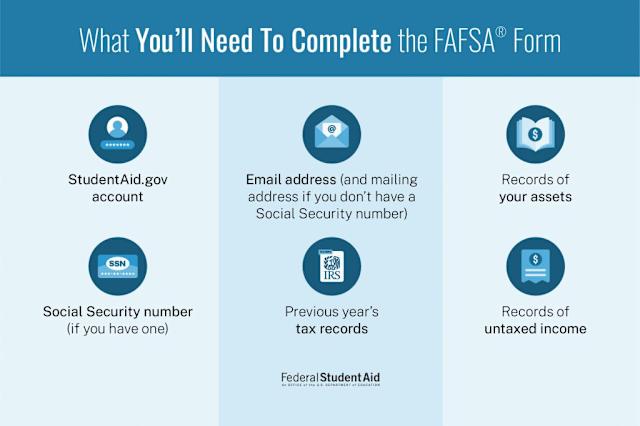
Collect the following documents before you begin:
- Your most recent federal income tax return (Form 1040), including all schedules. If you did not file taxes, you will need to provide a statement of non-filing.
- W-2 forms from all employers for the previous tax year.
- Records of untaxed income, such as child support received, interest income, or worker's compensation.
- Bank statements and investment records, including stocks, bonds, and mutual funds.
- Your Social Security number (or Alien Registration number if you are not a U.S. citizen).
- Your driver's license number, if you have one.
If you are a dependent student, you will also need these same documents for your parents. Make sure your parents are available to log in with their own FSA ID to authorize the data transfer or provide their information. Having everything organized in a single folder or digital file can save you significant time during the application process.
Fill out the 2026-27 FAFSA form
Completing the FAFSA is like building a bridge between your family’s finances and college funding. Every piece of data you enter supports that bridge, so accuracy matters more than speed. The 2026-27 form has been simplified to reduce friction, but the steps remain structured and sequential.

Start at studentaid.gov and sign in with your Federal Student Aid (FSA) ID. If you are a dependent student, your parent must also have their own FSA ID to co-sign the form. This digital signature is required for both parties to access and approve the application.
Fill in your personal details, including your Social Security number, date of birth, and citizenship status. You will also need to report your high school graduation date and any military service history. This section identifies who you are and establishes your eligibility baseline.

Search for and add the colleges you are interested in. The FAFSA does not limit how many schools you can list, and sending your data to them is free. Each school will use this information to calculate your financial aid package, so include all realistic options.
Use the Direct Data Exchange (DDX) to pull tax information directly from the IRS, or manually enter the data. The new form relies heavily on this imported data rather than asking for complex calculations. Ensure the income figures match your most recent tax return to avoid delays.

Both you and your parent (if dependent) must digitally sign the form. Review every section for accuracy before submitting. Once sent, you will receive a confirmation page and an email. Keep this confirmation for your records as you wait for your Student Aid Index (SAI) to be calculated.
After submission, the Department of Education will process your data and send your Student Aid Index to the schools you listed. This number is the starting point for your financial aid offer. If you spot errors on your Student Aid Report, you can correct them directly in the online form.
Review your Student Aid Report
The easiest mistake with FAFSA is comparing options on the most visible detail while ignoring the day-to-day constraint. A choice can look strong on paper and still fail because it is too hard to maintain, too expensive to repeat, or awkward in the actual setting. Use the same checklist for every option: fit, cost, durability, timing, upkeep, and fallback plan. That keeps the comparison practical instead of drifting into preference alone.
The simplest way to use this section is to write down the real constraint first, compare each option against it, and choose the path that still works outside ideal conditions.
Compare financial aid offers
When colleges send their financial aid award letters, they often look similar on the surface but hide very different costs and obligations. The goal is to compare the "net price"—what you actually pay out of pocket—rather than just looking at the total aid amount. A higher total aid offer might include more loans, which increases your future debt.
Grants and scholarships vs. loans
The most important distinction in any award letter is between free money and borrowed money. Grants and scholarships do not need to be repaid. Federal loans must be paid back with interest, even if the interest is subsidized while you are in school.
| Aid Type | Repayment Required? | Interest Rate (2026-27) | Best For |
|---|---|---|---|
| Federal Grants | No | N/A | Reducing net cost without debt |
| Federal Subsidized Loans | Yes | 6.53% | Students with financial need |
| Federal Unsubsidized Loans | Yes | 6.53% | Students regardless of financial need |
| Work-Study | No (Earned wages) | N/A | Part-time on-campus employment |
Source: Federal Student Aid Handbook, 2026-2027
Checklist for comparing offers
Use this checklist to evaluate each college’s offer side-by-side. Focus on the components that affect your long-term financial health.
-
Total Cost of Attendance (COA): Compare the full sticker price, including tuition, fees, room, board, and books.
-
Grant/Scholarship Amount: Identify the total amount of free money. Prioritize schools offering the most grants.
-
Federal Loan Limits: Check if the offer includes subsidized loans (better) or unsubsidized loans.
-
Work-Study Opportunities: Note if work-study is offered, but remember it is not guaranteed income.
-
Net Price Calculation: Subtract grants and scholarships from the COA to find the true cost.
Next steps
Once you have compared the offers, use the Net Price Calculator on each college’s website to refine your estimate. If an offer seems low, you can sometimes appeal for more aid by writing a professional judgment letter. Always prioritize grants and subsidized loans over unsubsidized loans or private loans.
Navigate new repayment plans
The FAFSA doesn’t just determine what you borrow today; it sets the stage for how you repay that debt years later. With the 2026-27 cycle, the Department of Education has introduced updated Income-Driven Repayment (IDR) plans designed to lower monthly payments and shorten the path to loan forgiveness. Understanding these changes now helps you avoid surprise bills after graduation.
The most significant change is the expansion of the SAVE plan’s benefits. Monthly payments are now capped at 5% of discretionary income for undergraduate loans, down from the previous 10%. This applies to both new and existing borrowers who switch to the new plan. If your calculated payment is $0, the government will not charge interest on your subsidized loans while you’re in school or during your grace period. This interest subsidy prevents your debt from growing while you’re still finishing your degree or looking for work.
For borrowers with graduate or professional degrees, the payment cap remains at 10% of discretionary income. However, the new rules also adjust how family size and partial-year earnings are calculated, often resulting in lower payments for larger households. It is crucial to recalculate your repayment plan annually through StudentAid.gov, as changes in income or family status can significantly impact your monthly obligation.
Log in to your FSA ID account at StudentAid.gov. Navigate to the Repayment section to see if you qualify for the new IDR plans. The system will automatically calculate your estimated payment based on your current income and family size.
If you are already on an older IDR plan, you can switch to the new SAVE plan without penalty. This move can lock in the 5% payment cap and interest subsidy. Ensure you submit the new application before your next payment due date to avoid late fees.
Enroll in automatic debit from your bank account. This ensures you never miss a payment, which protects your credit score. While the interest rate discount is temporary, maintaining a perfect payment history is essential for long-term loan management.
These plans are built for flexibility. If your income drops after graduation, your payments will adjust downward automatically. This safety net ensures that your student loan debt remains manageable relative to your actual earning power, rather than a fixed burden that stifles your early career growth.
Common FAFSA mistakes to avoid
Even with a streamlined application process, small errors can delay your aid or result in a denial. These are the most frequent pitfalls we see, along with how to fix them before submission.
Missed deadlines
Federal FAFSA deadlines are firm, but state and school deadlines often come much earlier. Missing a state priority deadline can cost you thousands in grant money that isn't tied to federal loans. Check your state’s higher education website and each college’s financial aid page for their specific cutoff dates. Set a reminder for at least two weeks before the earliest deadline.
Incorrect Social Security Numbers
The system is strict about identity verification. A single digit error in your SSN or your parents’ SSNs will cause an immediate rejection. Double-check these numbers against your physical Social Security cards or tax returns before entering them. If you don’t have an SSN but are eligible (such as certain conditional residents), you must enter your Alien Registration Number instead.
Ignoring verification requests
About 25% of applicants are selected for verification, a process where the school confirms the data you reported. If you receive a notification, you must submit additional documents like tax transcripts or household size proofs. Ignoring this step will freeze your aid package. Respond to verification requests within 48 hours to keep your funding timeline on track.
Steps to prevent these errors
Before hitting submit, go back through every section. Check names, dates, and SSNs against your official documents. Use the "preview" function if available to see how the data will look.
Mark federal, state, and school deadlines in your calendar. Set alerts for one week prior to each date so you have time to correct any issues that arise.
Log in regularly to check your FAFSA submission status. If you see a "missing information" or "verification" flag, address it immediately using the instructions provided.
Frequently asked: what to check next
Here are answers to the most common questions about the 2026-27 FAFSA cycle.
For the most current deadlines and form updates, always refer to the official studentaid.gov website.
No comments yet. Be the first to share your thoughts!