

Get your FSA ID ready first
Before you log in to fafsa.gov to start the application, you need a valid FSA ID. This digital signature acts as your legal access credential for the Federal Student Aid system. Without it, you cannot sign the FAFSA form, and the application will remain stuck in "pending" status.
The FSA ID is required for both the student and any parents who will contribute financial information. Create these accounts early. The system needs time to verify your identity using your Social Security number and personal details. This verification process can take up to three days to complete.
If you wait until the last minute to create your ID, you risk missing early state or institutional aid deadlines. Treat your FSA ID as the first step in your FAFSA guide workflow, not an afterthought.
Go to fsaid.ed.gov and select "Create an FSA ID." Enter the student's name, Social Security number, and date of birth. Set a secure password and choose security questions. Check your email for the confirmation link to activate the account.
Repeat the process for the contributing parent. Use the parent's personal information, not the student's. Once activated, the parent can use this ID to log in and provide their financial data when the student's application prompts for it.
Gather tax and financial documents
Start by collecting the paperwork that proves your family’s financial standing. You will need Social Security numbers for every family member listed on the FAFSA, along with current driver’s licenses or state IDs. If you are a dependent student, your parents must also provide their identification documents.
Keep recent tax records within reach. The FAFSA Guide emphasizes the Direct Data Exchange (DDX) as the simplest way to handle tax information. This secure system pulls your Adjusted Gross Income directly from the IRS into your form, sparing you the need to manually enter complex tax data. If the DDX does not work for your situation, have your IRS Tax Return Transcript or W-2 forms ready as a backup.
Next, gather records of untaxed income and assets. This includes cash, savings, and checking account balances as of the day you file. If your family owns a business or a farm, you will need current balance sheets. Keep records of investments, such as stocks and bonds, and note any child support paid or received.
Finally, list your household’s major expenses. You will need to report how much you pay for college costs, home mortgage interest, and medical or dental expenses that were not reimbursed by insurance. Having these figures ready ensures you complete the FAFSA Guide’s financial sections accurately.
Fill out the student information section
The student information section is the foundation of your FAFSA Guide. This part requires your personal and demographic data, which the Department of Education uses to verify your identity and calculate your financial aid eligibility. Accuracy here is non-negotiable; errors can delay your aid offer or cause identity mismatches.
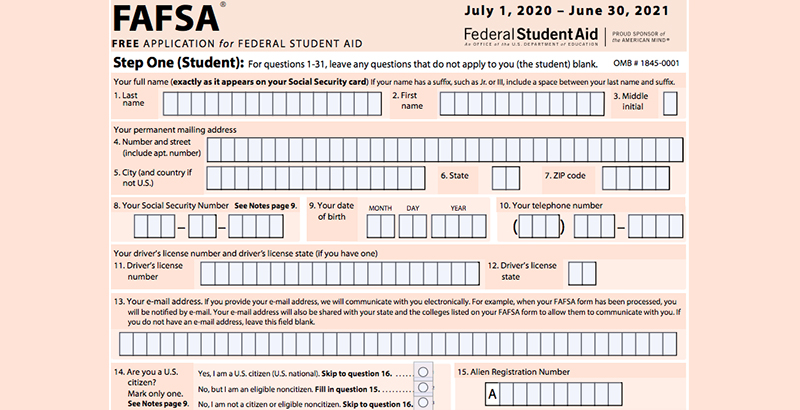
Start by entering your legal name exactly as it appears on your Social Security card. If you have a legal name change, use your current legal name, not a nickname or former name. Next, provide your date of birth and Social Security number. These details must match federal records precisely to pass the initial verification checks.
Type your full legal name, date of birth, and Social Security number into the designated fields. Double-check for typos, as even a single digit error in your SSN can flag your application for manual review.
Enter your mailing address, email, and phone number. Answer the citizenship and eligible noncitizen status questions honestly. If you are not a U.S. citizen, you will need to provide your Alien Registration Number if applicable.
Review your gender, race, ethnicity, and marital status. These details help determine specific grant opportunities and demographic reporting. Ensure your marital status reflects your legal standing on the date you submit the form.
Once you complete these fields, you can move on to the student financial section. Keeping this initial data accurate saves time later and prevents unnecessary delays in processing your FAFSA form.
Enter financial data and consent
The most critical part of the FAFSA Guide involves the consent checkboxes. These aren't just formalities; they are the mechanism that allows the government to verify your financial reality. Without explicit permission, the system cannot pull your tax data, and your application will remain incomplete.
1. Grant consent for tax data retrieval
You will encounter a section asking if you want to use the IRS Data Retrieval Tool (DRT). This tool pulls tax information directly from the IRS into the FAFSA form. Selecting "Yes" is the most efficient path. It reduces manual entry errors and speeds up the verification process later. If you choose not to use the DRT, you must manually type in every income and asset figure, which increases the risk of discrepancies.
2. Review and sign the declaration
Once the financial data is populated, you must digitally sign the form. This is a legal declaration that the information provided is accurate to the best of your knowledge. For students, this step is straightforward. For parents or spouses providing support, they must log into their own FSA ID to sign their respective sections. The system will not allow submission until all required signatures are in place.
3. Submit the FAFSA
After signing, review the summary page one last time. Click "Submit" to send the form to the Department of Education. You will receive a confirmation page and an email with your FSA ID and a summary of your submission. Keep this information safe, as you will need it to make corrections or view your Student Aid Index (SAI) later.
Add colleges to your submission list
The FAFSA does not automatically send your financial information to the schools you plan to attend. If you skip this step, the colleges cannot calculate your aid package, and you might miss out on grants or work-study opportunities.
You need to manually enter the Federal School Code for each institution where you want your data sent. You can find these codes on the Federal School Code Search tool on the FAFSA website. If you are applying to multiple schools, add them all at once to ensure everyone receives your data simultaneously.
Keep a record of the codes you enter. If you change your mind about a school later, you can log back into your FAFSA account to add more codes or remove ones you no longer need. This list is your direct line to potential funding.
Review common mistakes to avoid
Even with the 2026 FAFSA Guide simplifying the process, small errors can delay your aid or reduce your eligibility. The federal government’s StudentAid.gov portal flags these issues automatically, but catching them before submission saves weeks of back-and-forth. Focus on these four high-impact areas where most applicants stumble.
Leaving fields blank
If a question doesn’t apply to you, do not skip it. Leave fields blank only when the form explicitly instructs you to. Otherwise, enter zero or select “Not Applicable.” Blank fields often trigger an automatic rejection or a request for verification, which pauses your processing until you log back in to clarify.
Selecting the wrong tax year
The FAFSA now uses Direct Data Exchange (DDX) to pull IRS data directly, but you must still confirm the correct tax year. For the 2026–27 cycle, you are reporting income from the 2024 tax year. Selecting 2025 (which hasn’t been filed yet) or 2023 will result in mismatched income figures and likely trigger an audit of your financial data.
Misinterpreting income: what to check next
Many families assume high income disqualifies them, but the FAFSA is not solely based on earnings. It looks at assets, household size, and number of family members in college. If you are unsure how to report self-employment income or investment gains, consult the official StudentAid.gov income calculator before submitting. Do not guess; incorrect numbers are harder to fix after submission.
Forgetting digital signatures
Both the student and at least one parent (if the student is dependent) must sign the form digitally. This is not just a checkbox; it is a legal declaration. If either signature is missing, the application is incomplete. Set a reminder to review the signature page together before hitting submit.
-
Verify Social Security Number matches ID exactly
-
Confirm 2024 tax year is selected for income data
-
Check all school codes are correct and active
-
Ensure both student and parent signatures are applied
Understand new repayment plan rules
The FAFSA Guide helps you estimate what you will owe, but it does not control how that debt is repaid. To understand your long-term costs, you need to look at the income-driven repayment (IDR) rules that take effect in 2026.
These new rules change how monthly payments are calculated. The Department of Education is shifting to a system that caps payments at a lower percentage of discretionary income. This means your monthly bill will likely be smaller, but the total time to pay off the loan may be longer. For many borrowers, this shift reduces immediate financial pressure while extending the repayment horizon.
When you review your FAFSA data, keep these changes in mind. A lower monthly payment might make borrowing feel more affordable right now, but it does not reduce the total interest you will pay. You should model your future payments using the 2026 IDR formulas to see how the extended term affects your overall debt burden.
For the official details on how these calculations are changing, consult the Federal Student Aid Handbook.

Frequently asked questions about FAFSA
These answers address common misconceptions about income limits, filing order, and common errors to help you complete your FAFSA Guide without delay.
No comments yet. Be the first to share your thoughts!