

FAFSA checklist before you start
Completing the 2026 FAFSA form is less about memorizing financial formulas and more about gathering the right paperwork. The Department of Education requires specific data points to calculate your Student Aid Index (SAI). If you miss a single document, your application stays incomplete, and your financial aid eligibility drops. Treat this checklist like a pre-flight inspection: verify every item before you begin the actual form.
The process starts with identity verification. You need an FSA ID, which serves as your legal electronic signature. Without it, you cannot submit the form or access your financial aid data. If you are a dependent student, one of your parents will also need their own FSA ID to sign the application. Create these accounts at least three days in advance, as identity verification can sometimes take longer than expected.
Next, gather your financial records. The FAFSA asks for specific tax information and asset data. For the 2026-2027 award year, you will need your (and your parents') federal tax returns from two years prior. Keep W-2s and records of untaxed income ready. Having these documents open in a separate browser tab or printed out prevents you from hunting for numbers mid-form, which reduces errors and submission anxiety.
Finally, compile a list of schools. You must enter at least one school to submit the form, but you can add up to twenty. Research which colleges accept FAFSA data and include them in your list. This step ensures that your financial aid offers are sent directly to the right institutions. Once you have your FSA ID, tax docs, and school list, you are ready to proceed.
Visit StudentAid.gov to create a username and password. This ID acts as your legal signature for all federal student aid forms. Dependent students must have a parent create a separate FSA ID to co-sign the application. Allow 24-72 hours for identity verification if you are setting up a new account.

Locate your federal tax returns from two years prior to the application year. For the 2026-2027 FAFSA, this means your 2024 tax return. Have W-2s and records of any untaxed income or benefits ready. Keep these documents accessible in a separate window or printed out to avoid switching tabs repeatedly.
Enter at least one school to submit your FAFSA, but add up to twenty. Include your dream schools, safety schools, and any institutions you are seriously considering. This ensures your financial aid offers are sent to the correct places. You can add more schools later, but having a solid list upfront speeds up the process.
Log in and answer student: what to check next
Start by logging into FAFSA.gov with your FSA ID. Once you reach the student information section, you will encounter two fields that determine the rest of your application: identity verification and dependency status. These are the most common failure points. If you get these wrong, the form either rejects your data or incorrectly classifies you as an independent student, which can disqualify you from significant need-based aid.
Verify your identity
Begin by entering your Social Security Number exactly as it appears on your card. If you do not have an SSN, you may be eligible to apply using an Individual Taxpayer Identification Number (ITIN). The system will validate this against federal records. If the validation fails, you will need to visit a Federal Student Aid office in person to verify your identity before proceeding.
Determine your dependency status
The FAFSA asks a series of questions to determine if you are considered dependent or independent. Most undergraduate students under age 24 are classified as dependent, meaning their parents' financial information must be included in the application. Answer these questions honestly. The system uses your responses to calculate your Student Aid Index (SAI).
If you are unsure about your status, use the Dependency Status Assistant tool on studentaid.gov. It walks you through the specific criteria, such as marital status, military service, or legal guardianship. Misclassifying yourself as independent when you are actually dependent is a common error that can lead to complications during the verification process later.
Type your full legal name, date of birth, and Social Security Number. Ensure there are no typos, as this data must match your government records exactly.
Respond to the dependency status questions. If you answer "yes" to any of the independent criteria, you will skip the parent information section. Otherwise, you must proceed to the parent data entry.
Enter financial and school data
This section covers the core of the FAFSA form: reporting your financial situation and selecting the colleges that will receive your application. The process relies on the Direct Data Exchange (DDX) to pull tax data directly from the IRS, which simplifies the entry process significantly compared to manual transcription. You will also need to add your target schools to the recipient list so they can access your data.
Start with the Direct Data Exchange
When you reach the financial aid section, you will see an option to use the IRS Data Retrieval Tool via the Direct Data Exchange. This is the recommended method for entering tax information. Instead of manually typing in adjusted gross income or taxes paid, the system securely transfers this data directly from the IRS to your FAFSA application. This reduces the chance of errors and speeds up the processing time for your aid package.
If the DDX is unavailable or you prefer to enter data manually, you can upload your tax transcript or type the figures from your 1040 form. However, manual entry increases the risk of typos, which can delay your aid eligibility. Ensure you are using the correct tax year as specified in the application instructions for the 2026-27 award year.
Add your schools to the recipient list
After entering your financial data, you must list the colleges you want to receive your FAFSA results. You can add up to 20 schools at a time. To do this, enter the school’s federal code or name. The system will auto-suggest the correct code. If you are unsure of a school’s code, you can find it on the Federal Student Aid website or by contacting the school’s financial aid office.
Adding schools early is important because processing times can vary. While some schools receive your data within a few days, others may take longer. Make sure to double-check the list before submitting. You can add more schools later if needed, but it is best to get it right the first time to avoid any delays in receiving your aid packages.
Review and submit
Once you have entered your financial data and selected your schools, review all entries for accuracy. Check your personal information, tax details, and school list. If everything looks correct, submit the form. You will receive a confirmation page and an email with your Student Aid Index (SAI) number. Keep this information safe, as you will need it when checking your status with the schools you listed.
Select the option to pull data directly from the IRS. This automatically fills in your tax information, reducing manual entry errors and speeding up processing. If DDX is unavailable, manually enter data from your tax transcript.

Enter the federal school codes for up to 20 colleges. Use the school search tool to find the correct code if you don't have it. Double-check each entry to ensure the schools receive your data accurately.
Carefully review all personal, financial, and school information. Submit the form once you are confident in the accuracy of the data. Save your confirmation page and note your Student Aid Index (SAI) number.
Review and sign the application
Before you submit, treat your FAFSA like a tax return: one signature isn't enough. The 2026 form requires both the student and at least one parent (for dependent students) to sign electronically using their FSA IDs. Without these digital signatures, the Department of Education cannot process your application, and it will remain incomplete.
Start by scrolling to the bottom of the form where the "Signatures" section appears. You will see separate blocks for the student and the parent. Click "Sign" next to each name. The system will prompt you to enter your FSA ID username and password to verify your identity. This step authenticates that you are who you say you are and that you consent to the data provided.
Once both parties have signed, review the "Signature Pages" summary to ensure all names match your FSA ID profiles. If everything looks correct, click "Submit FAFSA Form." You will receive an email confirmation and can check your status on the FSA website within 3-5 business days.
Understand your student loan options
The FAFSA doesn’t just hand out loans. It reveals a full financial aid package that may include grants, work-study, and federal loans. You need to separate the free money from the debt before you accept anything.
Grants are the best part of the package. They are based on financial need and do not require repayment. Federal work-study provides a part-time job to help pay for expenses, though not all schools offer these positions. These options reduce the amount you might need to borrow.
Federal student loans are the third option. Unlike private loans, they offer fixed interest rates and flexible repayment plans. You can defer payments while in school and qualify for forgiveness programs. Always max out subsidized federal loans before considering private alternatives.

Review your award letter carefully. It lists each aid source separately. If the total cost of attendance exceeds your grants and savings, the remainder is likely covered by loans. Borrow only what you need, not the full loan amount offered.
Navigate new repayment plans
The Department of Education has rolled out updated Income-Driven Repayment (IDR) rules for 2026. These changes lower monthly payments for many borrowers and expand eligibility for loan forgiveness. You do not need to reapply for the new plan automatically; you must take action to switch.
Follow this sequence to ensure your loan servicer applies the correct calculation.
Log in to StudentAid.gov to see which IDR plan you are currently in. Note your monthly payment amount and the remaining balance. This baseline helps you compare the potential savings under the new rules.
The 2026 updates may lower your payment to $0 if your income is below a certain threshold. Use the IDR Calculator on StudentAid.gov to estimate your new monthly payment. If the new plan offers significant savings, it is worth switching.
If you decide to switch, complete the IDR Account Holder or Borrower Disclosure and Request Form. You can submit this online through your Federal Student Aid account. Ensure all income and family size information is current to avoid processing delays.
Wait 30-45 days for your loan servicer to process the change. Check your next monthly statement to confirm the new payment amount is reflected. If the payment has not adjusted, contact your servicer immediately with your application confirmation number.
These steps streamline the transition to the new repayment structure. By following this sequence, you can ensure your payments align with your current financial situation without unexpected jumps in cost.
Common FAFSA mistakes to avoid
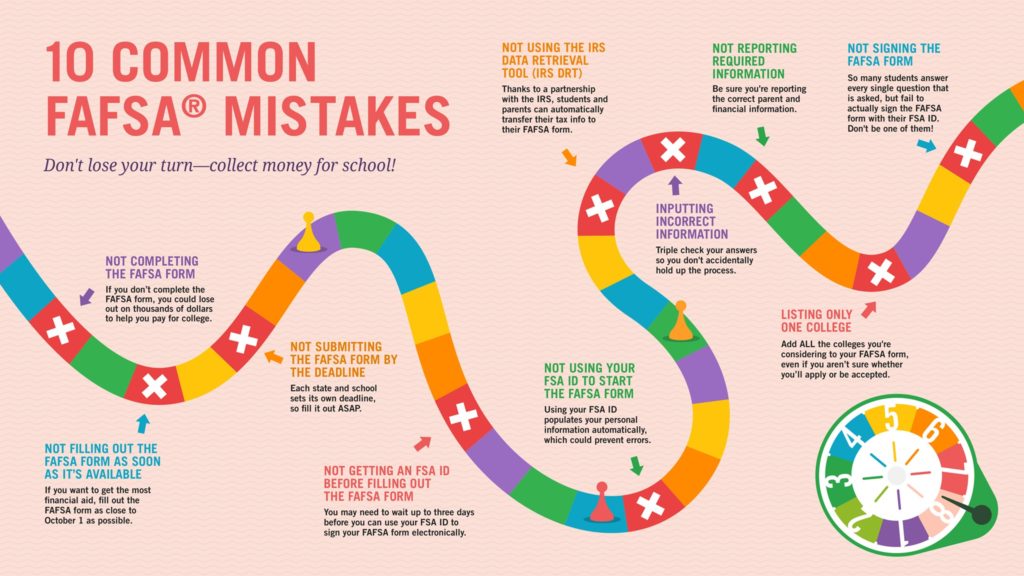
Small errors on the FAFSA form can delay your financial aid offer by weeks or even months. Federal Student Aid processes millions of forms, and automated systems flag discrepancies immediately. Fixing these issues requires submitting corrections, which resets your processing timeline.
The most frequent errors involve identity verification and school selection. Using an incorrect Social Security Number or omitting a required signature prevents the system from validating your application. Similarly, entering wrong school codes means your financial aid data never reaches the colleges you plan to attend.
Double-check your Social Security Number
Ensure the name and Social Security Number on your FAFSA match your Social Security card exactly. Mismatches trigger identity verification holds that stop processing until you resolve them with the SSA.
Add every school you're considering
You must enter the correct FAFSA school code for each college. You can add up to 20 schools at once. If you forget a school, you can add it later before the deadline, but delays in updating may affect aid packaging.
Sign and submit
Both students and parents (if dependent) must sign the form electronically using their FSA ID. An unsigned form is considered incomplete. Review the confirmation page to ensure all sections are marked as submitted.

Compare your FAFSA entries against your Social Security card. Correct any typos before saving.
Use the Federal School Code Search on studentaid.gov to find the correct code for each college.
Log in to your FSA ID to sign. Ask parents to sign their section if you are a dependent student.
Frequently asked questions about the 2026 FAFSA
When does the 2026-27 FAFSA open?
The 2026-27 FAFSA form opens in December 2025. You can submit it as soon as it launches, but you cannot do so before that date. Filing early is critical because some states and colleges distribute aid on a first-come, first-served basis. Waiting until later in the year may limit your eligibility for state grants or institutional scholarships.
How do I update my FAFSA after submitting?
You can update your FAFSA at any time by signing in to your FSA ID account and selecting "Make FAFSA Corrections." This is useful if you need to add or remove schools, correct financial figures, or add new information. Updated information is sent to the schools you listed, but it may take a few days for them to process the changes.
What happens if I make a mistake on my FAFSA?
Small errors, such as a typo in your Social Security number or an incorrect school code, can delay your aid processing. You can fix most mistakes by making corrections through your FSA ID account. If you made a major error that affects your Student Aid Index (SAI), you may need to contact the financial aid office at your college directly to request a professional judgment review.
Do parents need to fill out the FAFSA?
Yes, dependent students must provide their parents' financial information on the FAFSA. The form determines whether you are considered dependent or independent based on specific criteria, such as age, marital status, or military service. If you are considered dependent, your parents' tax returns and bank statements are required to calculate your aid eligibility.
Can I use the FAFSA to apply for private loans?
No, the FAFSA is only for federal financial aid, including grants, work-study, and federal student loans. Private loans are offered by banks and credit unions and require a separate application process. However, completing the FAFSA is often a prerequisite for private loans, as lenders may require proof that you have exhausted federal aid options.
No comments yet. Be the first to share your thoughts!