

Start with your FSA ID
The FAFSA Guide process begins long before you open the application form. It starts with your FSA ID. This identifier is your legal electronic signature for federal student aid, acting as both your username and password for studentaid.gov. Without it, you cannot log in to complete the FAFSA, sign the form, or access your financial aid data later.
Creating an FSA ID is not instantaneous. The system requires time to verify your identity against federal databases. If you are a dependent student, you will also need your parents to create their own FSA IDs to sign your application. Attempting to create these accounts on the day you plan to submit the FAFSA is a common bottleneck that can delay your entire application.
When you create the ID, you will need a valid email address and a Social Security Number. The email address becomes the primary recovery method for your account, so ensure it is one you check regularly. Once created, you can use this ID to sign the FAFSA electronically, which is required for your application to be processed.
Visit studentaid.gov and select "Create an Account." Enter your personal details, including your Social Security Number and date of birth. You will be prompted to create a username and a strong password. Choose an email address you have immediate access to, as it will be used for all future communications and account recovery.
After submitting your information, the system will verify your identity. This process involves checking your data against federal records. You will receive a confirmation email shortly after registration. If you do not receive this email within a few hours, check your spam folder or contact Federal Student Aid support.
If you are a dependent student, your parents must also create their own FSA IDs. They will use these IDs to electronically sign your FAFSA form. Ensure they complete this step early, as their verification timeline runs parallel to yours. Spouses of independent students also need their own FSA IDs to sign.
Having your FSA ID ready removes the first major hurdle in the FAFSA Guide workflow. It allows you to focus on gathering financial documents and answering questions without worrying about technical access issues. Treat this step as the foundation of your application; a smooth start prevents delays later in the process.
Gather tax and financial records
Before you log in to studentaid.gov, collect the necessary documents. Having everything ready prevents interruptions and errors. This FAFSA Guide focuses on the paperwork you need for the 2026-27 cycle.
Required documents
Prepare these items before starting:
- Federal tax returns: Most applicants need the 2024 IRS Form 1040. Use the IRS Data Retrieval Tool to transfer data directly.
- W-2 forms: Collect all W-2s from 2024 for the student and parents.
- Bank statements: Gather current balances for checking and savings accounts.
- Investment records: Include values for stocks, bonds, and real estate (excluding the primary home).
- Business records: If applicable, include current business and farm inventory details.
Having these records ready speeds up the process. Missing documents often delay aid offers.
Enter student information
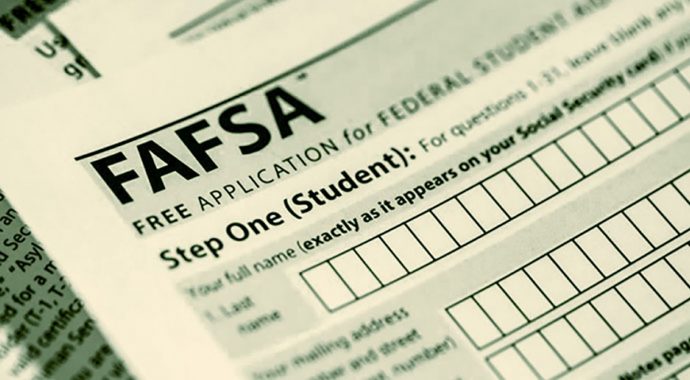
The first section of the FAFSA form asks for your basic identity details. This data is used to verify who you are and determine your eligibility for federal student aid. Accuracy here is critical because errors can delay the processing of your application or cause your school to reject your submission.
Verify your identity
Start by entering your legal first name, middle initial, and last name exactly as they appear on your Social Security card. Do not use nicknames or abbreviations. If your name has been changed legally since your Social Security card was issued, update your card with the Social Security Administration before filling out the form.
Input your Social Security Number
Enter your nine-digit Social Security Number (SSN) without hyphens. The system will automatically format it. If you do not have an SSN, you must select the option indicating you are not a U.S. citizen or eligible noncitizen and provide your Alien Registration Number instead. Double-check each digit; a single typo can flag your application for manual review.
Confirm your date of birth
Enter your birth date in the format requested (MM/DD/YYYY). This information helps the Department of Education verify your identity and calculate your expected family contribution based on your age and dependency status. Ensure it matches your government-issued ID.
State your citizenship status
You will be asked if you are a U.S. citizen, a U.S. national, or an eligible noncitizen. Most applicants are U.S. citizens. If you are an eligible noncitizen, you must have a valid Alien Registration Number. Incorrectly selecting your citizenship status can disqualify you from federal aid entirely.
Enter your contact information
Provide your current mailing address, email address, and phone number. Use an email address you check regularly, as this is how you will receive your Student Aid Index (SAI) and other important updates from the Department of Education. If you have a Federal Student Aid (FSA) ID, log in with it to auto-fill some of this data.
Before moving to the next section, review every field. Ensure your name, SSN, and birth date match your official records. If you spot an error, click the "Edit" button to correct it immediately.
Once you are confident in the accuracy of your student information, click "Save and Continue" to proceed to the financial section. The system will not let you proceed if required fields are empty.


As an Amazon Associate, we may earn from qualifying purchases.
Enter financial data and school codes
The FAFSA form asks for specific financial details, but you don’t need to do the math yourself. The easiest way to handle this section is to use the IRS Data Retrieval Tool (DRT), which pulls your tax information directly from the IRS and fills in the relevant fields on your FAFSA. This reduces errors and speeds up the process.
If you cannot use the DRT, you will need to enter your income and asset information manually. Be careful to round numbers to the nearest dollar and avoid using commas or decimal points in numeric fields. Leaving fields blank can cause miscalculations or rejection, so enter a "0" or "not applicable" if a field does not apply to your situation.
After entering your financial data, you will need to select up to 20 schools to receive your Student Aid Report (SAR). You can search for schools by name or federal school code. If you haven’t decided on a college yet, you can add placeholder schools or update the list later before the final submission deadline.
Click the "Link to IRS" button in the financial information section. Follow the prompts to authenticate with the IRS and transfer your tax data directly into your FAFSA. This is the most accurate way to report your income.
If the DRT is unavailable, enter your adjusted gross income, taxes paid, and assets manually. Double-check that you are using the correct tax year and that all numeric fields are filled in to avoid processing delays.
Search for your target colleges by name or FAFSA school code. You can add up to 20 schools to your list. These schools will receive your Student Aid Report so they can determine your financial aid eligibility.
Review common FAFSA errors
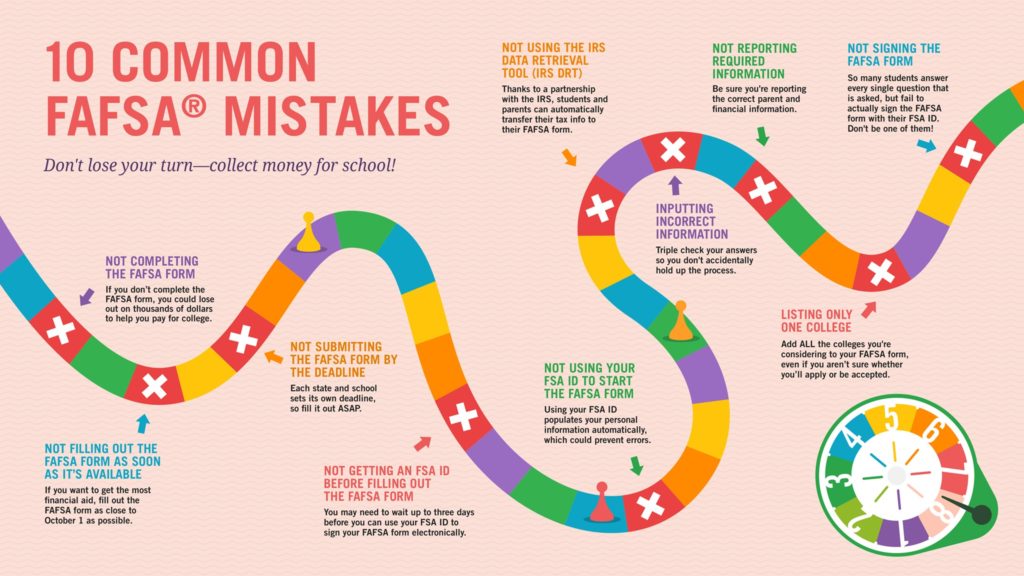
A small typo or missing number can delay your aid offer or trigger a verification request. Treat your FAFSA Guide like a tax form: accuracy matters more than speed. Before you click submit, scan the following error traps.
Leaving fields blank
The form rejects incomplete submissions. If a question doesn’t apply to you, enter zero or the required placeholder. Blank fields often cause calculation errors or immediate rejection.
Using commas or decimals in numbers
Enter whole numbers only. Round to the nearest dollar. A comma or decimal point in a box meant for integers can break the system’s validation rules.
Mismatched Social Security Numbers
One digit off and your application is flagged. Double-check the SSN against your card. For dependents, ensure the parent’s SSN is entered correctly, not the student’s.
Selecting the wrong tax year
The FAFSA asks for prior-prior year income. Using last year’s taxes instead of the required two-year-old data will skew your Expected Family Contribution and reduce your aid eligibility.
Understand your loan costs and repayment
After you submit your FAFSA, you will receive a Student Aid Report (SAR) summarizing your data. This document calculates your Expected Family Contribution (EFC), which schools use to build your financial aid package. Once you receive your award letter, you must carefully review the loan offers before accepting any funds. Understanding the difference between subsidized and unsubsidized loans is critical to managing your long-term debt.
The federal government offers Direct Subsidized, Direct Unsubsidized, and Direct PLUS loans. Each has distinct interest rates and eligibility requirements. Use the table below to compare the current terms for the 2025-2026 academic year. Always prioritize subsidized loans first, as the government pays the interest while you are in school.
| Loan Type | Interest Rate | Eligibility | Interest Paid by Gov? |
|---|---|---|---|
| Direct Subsidized | 6.53% | Undergraduate students with financial need | Yes, while in school |
| Direct Unsubsidized | 6.53% | Undergraduate, graduate, and professional students | No |
| Direct PLUS (Graduate) | 9.08% | Graduate or professional students | No |
| Direct PLUS (Parent) | 9.08% | Parents of dependent undergraduate students | No |
Repayment typically begins six months after you graduate, drop below half-time enrollment, or leave school. For subsidized loans, interest does not accrue during this grace period. For unsubsidized and PLUS loans, interest begins accruing immediately. You can choose from several repayment plans, including standard, graduated, or income-driven options. Income-driven plans cap your monthly payments based on your earnings, which can provide relief if your post-graduation income is lower than expected.
When reviewing your aid package, calculate the total cost of borrowing, not just the monthly payment. A lower monthly payment might mean a longer repayment term and more total interest paid. If you are considering private loans, compare them against federal options, as federal loans offer forgiveness programs and flexible repayment that private lenders rarely match. Always borrow only what you need to minimize future financial strain.
Frequently asked questions about FAFSA
The FAFSA Guide addresses common concerns to help you file without delay. Use the official studentaid.gov portal for the fastest experience.
No comments yet. Be the first to share your thoughts!